Handoff in the Pipeline
This guide breaks down the five stages of the Handoff pipeline, illustrating how Figma plugins, CLI tools, and REST APIs work together to automate your delivery workflow. Understand the architecture behind the automated design-to-development journey.
Handoff is not a standalone design tool or CMS. It sits between design and development — connecting the two by making structured design decisions available as data that both humans and machines can consume.
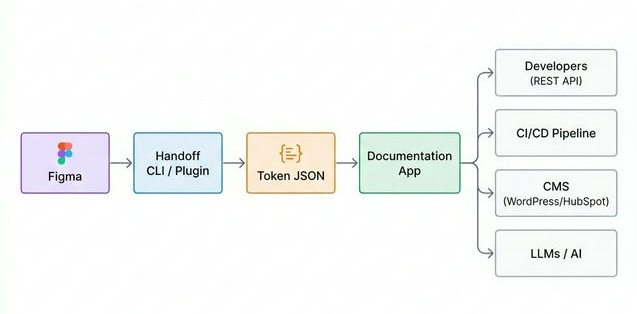
The Five Stages
1. Design in Figma
Designers work in Figma, building and maintaining component libraries and foundation styles. The Handoff Figma Plugin is used to annotate components with structured metadata.
Role: Designers, Design Leads
2. Extract with the CLI or Plugin
The Handoff CLI (handoff-app fetch) connects to the Figma REST API and extracts all published design decisions as structured JSON.
example.shbash1handoff-app fetch
This produces exported/tokens.json — the canonical, versioned representation of your design system.
Role: Design System Engineers, CI/CD
3. Token JSON — The Source of Truth
tokens.json is the structured output that powers everything downstream. It contains:
- Colors, typography, effects (design foundations)
- Component definitions, variants, and preview data
- Metadata: categories, usage guidelines, accessibility notes
This file can be versioned in Git, diffed between releases, and consumed by any tool.
4. Documentation App
Handoff builds a static React documentation site from the token data. This site provides:
- Interactive live previews of components
- Token values with copy-to-clipboard
- Usage guidelines from Figma annotations
- REST API for programmatic access
example.shbash1handoff-app build:app
The built site can be deployed to any static host.
5. Consumers
The documentation app's REST API makes design system data available to:
| Consumer | How They Use It |
|---|---|
| Frontend Developers | Import CSS/SCSS variables, consume component previews |
| CI/CD Pipelines | Validate that code matches approved tokens |
| CMS Platforms | Pull tokens into WordPress, HubSpot, and other CMS tools |
| LLMs / AI Agents | Use structured component schema as context for code generation |
Automation with CI/CD
A common pipeline setup with GitHub Actions:
example.yamlyaml1# .github/workflows/handoff-sync.yml
2name: Sync Design System
3on:
4  schedule:
5    - cron: '0 9 * * 1'  # Every Monday morning
6  workflow_dispatch:
7
8jobs:
9  sync:
10    runs-on: ubuntu-latest
11    steps:
12      - uses: actions/checkout@v3
13      - run: npm ci
14      - run: npm run fetch
15        env:
16          HANDOFF_FIGMA_PROJECT_ID: ${{ secrets.FIGMA_PROJECT_ID }}
17          HANDOFF_DEV_ACCESS_TOKEN: ${{ secrets.FIGMA_TOKEN }}
18      - run: npm run build:components
19      - run: npm run build:app
20      - name: Deploy to hosting
21        run: # your deploy command here
Next Steps
- Designers: From Figma to Handoff
- Developers: CLI Quickstart
- Consumers: REST API Overview