REST API Overview
The Handoff REST API provides programmatic access to your design tokens, component definitions, and system metadata. This overview explains how to authenticate, where to find your base URL, and how to make your first request to the platform. Discover how to build powerful integrations and automations on top of your design system data.
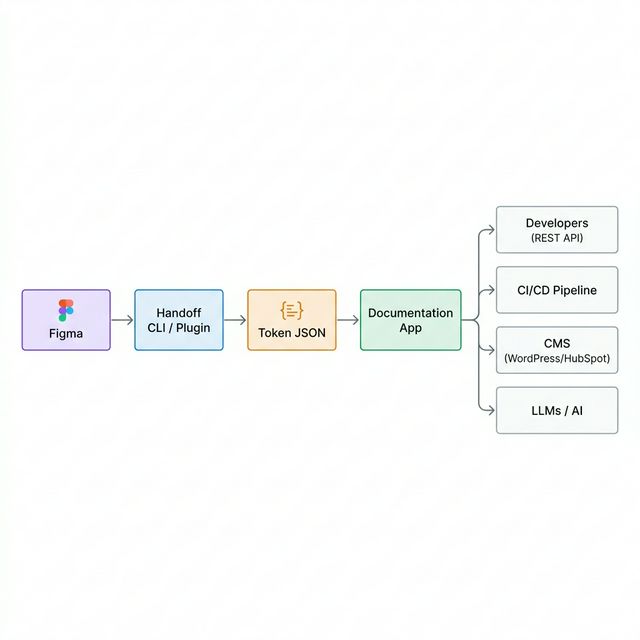
The Handoff documentation app exposes a REST API that gives programmatic access to your design system's tokens, components, and metadata. Any system that can make an HTTP request can consume your design system, enabling a truly universal source of truth.
When to Use the API
Use the REST API when you need to pull current token values into a build pipeline, consume component definitions from a CMS such as WordPress or HubSpot, or provide design system context to an AI agent. It is also perfect for building custom tooling that validates your codebase against the approved system architecture.
Base URL
All API endpoints are served from the root of your Handoff documentation app. During local development, this is typically http://localhost:3000/api/. In production, use the URL where your documentation site is hosted followed by /api/.
Authentication
The Handoff API is read-only and does not require authentication to consume published data. If you are hosting your documentation site privately, you should apply authentication at the hosting or CDN layer to protect your system's data.
Available Resources
| Endpoint | Description |
|---|---|
/api/tokens.json | All design tokens including colors, typography, and effects. |
/api/components.json | All component definitions in your system. |
/api/component/{name}.json | A single component definition by its name. |
/api/icons-sprite.svg | The SVG icon sprite for all icons in the system. |
/api/icons-sprite-manifest.json | Icon manifest listing all available icon IDs. |
Making Your First Request
1. Fetch All Tokens
example.shbash1curl https://your-handoff-site.com/api/tokens.json
Next Steps
- REST API Reference — Explore full endpoint documentation and response shapes.
- CLI Quickstart — Run Handoff locally and generate your own API data.